
Issue a refund to a tenant
What a refund is
A refund returns money to a tenant — most often a leftover security deposit at move-out, or an overpayment. It records the money going out, the account it comes from, and how you paid it back (check, cash, EFT, credit card, or directly from a bank account). If you print checks from TenantLedger, a refund can generate the check.
Use a refund when money actually leaves your account back to the tenant. (If you only want to reduce what a tenant owes — not hand money back — use a credit instead. See Issue a credit to a tenant.)
Before you start
- The tenant must be on a lease.
- If you’re refunding by check and want the system to track the check number, set up the bank account first.
Steps
-
In the left sidebar, click Leases, then open the lease.
-
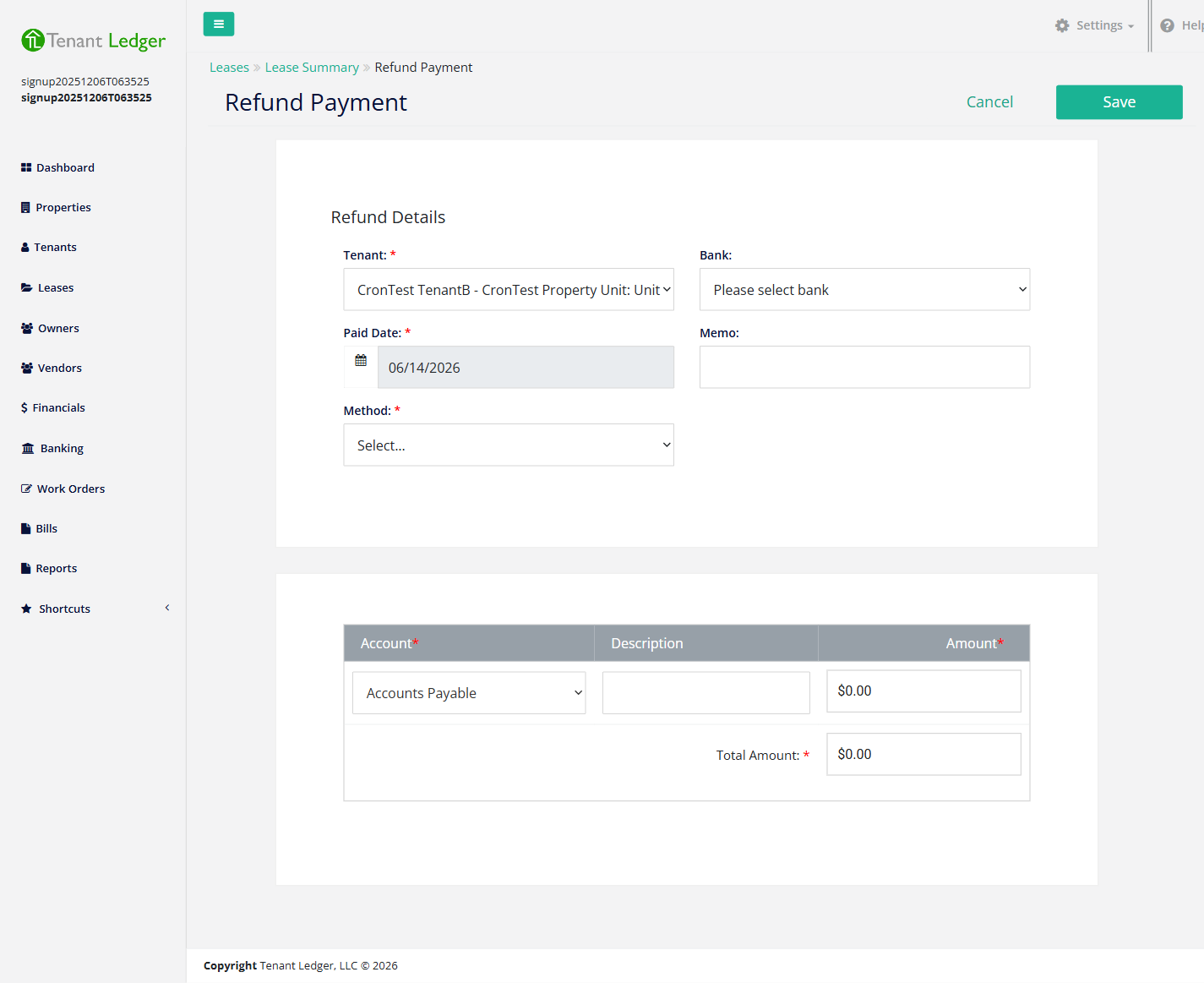
On the Lease Summary page, click the Action menu (top-right) and choose Refund Payment.
-
Confirm the Tenant shown at the top of the form.
-
Confirm the Paid Date (the date you’re returning the money) and, optionally, enter a Memo describing the reason.
-
Choose the Method: Check, Cash, EFT, Credit Card, or Bank Account.
- For a check, you can choose Print Check (Yes/No) and enter a Check #.
- For methods that draw on a bank, choose the Bank the money comes from.
-
In the account table, choose the Account the refund is charged against (grouped under Current Liability and Income), add an optional Description, and enter the Amount. Picking the right account keeps your reports accurate — for a security deposit refund, use the deposit / current-liability account.
-
Make sure the Total Amount equals the refund Amount — the two must be equal, or the form won’t save.
-
Click Save.
What you’ll see
You land on the Refund Summary page showing the refund amount, the method, and the tenant and property it was issued for. The refund is recorded against the lease, and if you chose to print a check it’s queued for printing.
Tips
- When a refund is tied to a specific payment, the refund amount can’t exceed that original payment amount.
- At move-out, settle the deposit before refunding: apply it to any outstanding charges first, then refund the remainder. See Move a tenant out and end a lease.
- Need to fix a refund you already saved? Open the Refund Summary and choose Edit Refund from the Action menu. To remove it entirely, see Delete a refund.
Related articles
Still stuck? Email support@tenantledger.com and a real person who knows the product will help.