
Move a tenant out, remove a tenant, and end a lease
What these actions do
There are three related things you can do when someone is leaving, and they’re not the same:
- Move Out Tenant — records a move-out date for one tenant on a lease that still has other tenants, and re-sets who’s responsible for the rent going forward. The tenant’s history stays on the lease.
- Remove Tenant — takes a tenant off the lease entirely (used to undo a tenant added in error, or remove someone who has no financial history on the lease). This one has rules about what blocks it — see below.
- End Lease — terminates the whole lease when everyone is leaving, gives every tenant a move-out date, and prompts you to settle charges and the deposit.
This article covers all three, plus handling the security deposit.
Before you start
- The lease must already exist and not already be terminated.
Move one tenant out (lease continues)
Use this when one co-tenant leaves but the lease stays active for the remaining tenants.
-
In the left sidebar, click Leases, then open the lease.
-
On the Lease Summary page, click the Action menu (top-right) and choose Move Out Tenant.
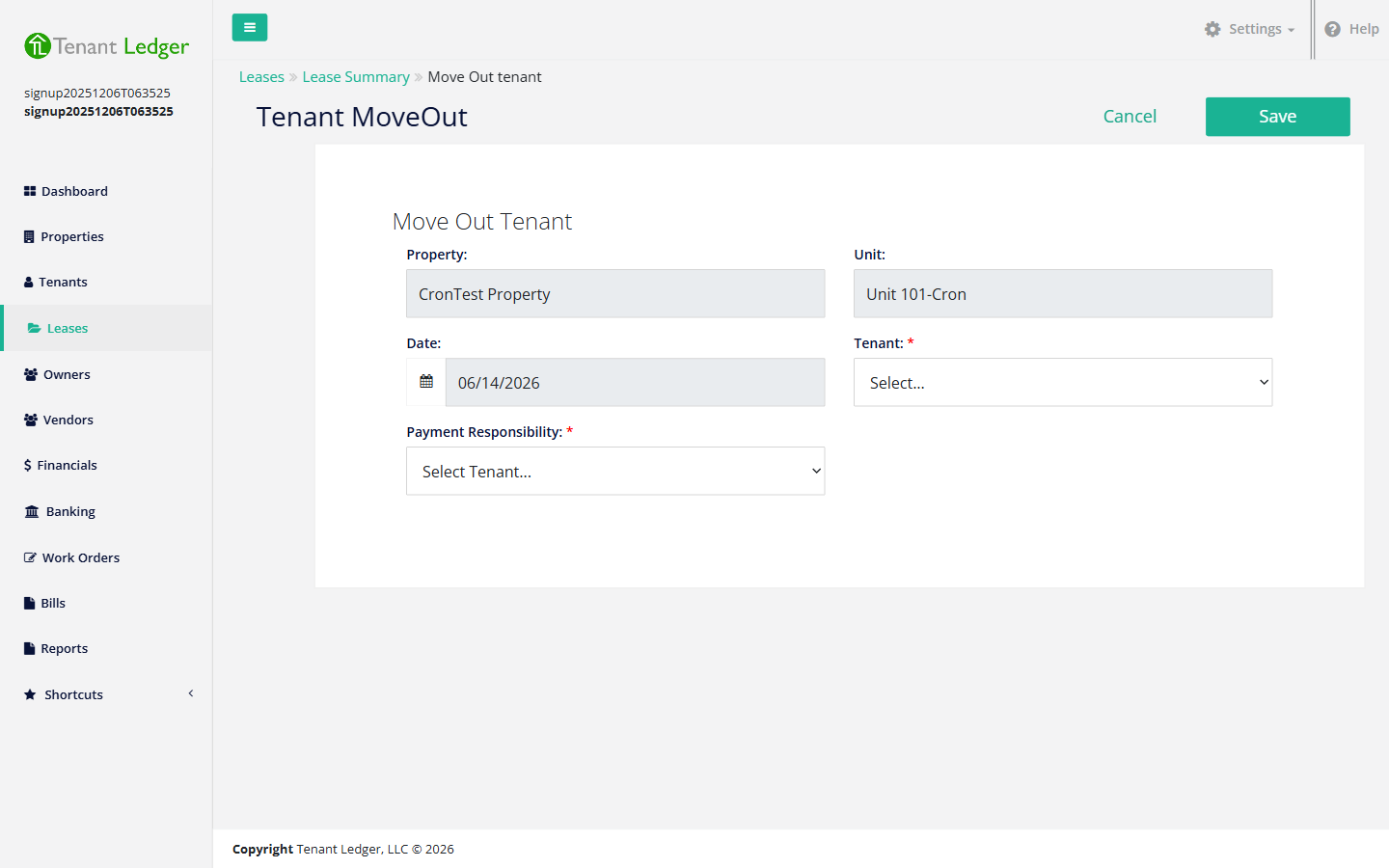
-
Confirm the move-out Date.
-
Choose the Tenant who is moving out.
-
Set the Payment Responsibility for the remaining tenants:
- Multiple Responsibility — the rent stays owed by the lease as a whole.
- Individual Responsibility — choose the Main Tenant Responsible for the rent going forward.
-
Click Save.
Note: You cannot move out the only tenant on a lease — at least two tenants are required to use Move Out Tenant. If you try with a single-tenant lease, the app shows a “Cannot Move Out Tenant” notice. If everyone is leaving, end the lease instead (below).
Remove a tenant from the lease
Use this to take a tenant off the lease completely — for example you added the wrong person, or a co-tenant who never had any charges should come off.
- On the Lease Summary page, find the tenant in the tenants list, open their row’s menu, and choose Remove Tenant.
- Confirm in the Confirm Remove Tenant pop-up.
What blocks removing a tenant
A tenant cannot be removed from a lease while any of these is true:
- This tenant is the main responsible tenant on the lease.
- This tenant has one or more charges on this lease.
- This tenant has one or more recurring charges on this lease.
If any apply, the app blocks the removal and shows a “Cannot Remove Tenant” message such as:
“This tenant cannot be removed because this tenant is the main responsible tenant on the lease; this tenant has 2 charges on this lease. Please resolve these issues before removing the tenant.”
To clear it: reassign the main responsible tenant to someone else (edit the lease’s payment responsibility), delete or reassign the tenant’s charges and recurring charges on the lease, then remove the tenant. If the tenant actually lived there and has real history, move them out instead of removing them, so the record is preserved.
End the whole lease
Use this when the lease is over and everyone is moving out.
- On the Lease Summary page, click the Action menu and choose End Lease.
- Review the lease info and the list of tenants on the End Lease page. It also lists the recommended next steps:
- Enter any additional charges
- Apply deposits to charges
- Refund any deposits
- Print the tenant statement
- Click Save to end the lease. The lease is marked Terminated and all tenants are given a move-out date.
Handling the security deposit
After (or before) ending the lease, settle the deposit:
- Apply the deposit to unpaid charges — record a payment against the tenant’s outstanding charges using the deposit. See Receive a rent payment.
- Refund the remaining deposit — return any leftover deposit to the tenant. See Issue a refund to a tenant.
What you’ll see
After a move-out or ending the lease, you return to the Lease Summary. A terminated lease is labeled Terminated, and moved-out tenants show their move-out date. A removed tenant no longer appears in the tenants list.
Tips
- Work through the four next-steps in order so the tenant’s final balance and deposit are settled correctly before you refund anything.
- Print the tenant statement at the end so the tenant has a clear record of charges, payments, and the deposit settlement.
- Remove Tenant is for taking someone off the lease; Move Out Tenant is for recording that someone left. Choose based on whether you want to keep their history on the lease.
Related articles
Still stuck? Email support@tenantledger.com and a real person who knows the product will help.