
Record a miscellaneous transaction (other income not tied to a bill or charge)
A miscellaneous transaction records money coming in that isn’t tied to a tenant charge or a vendor bill — bank interest, a vending-machine payment, a small reimbursement, or other incidental income. It posts the income to an account you choose and can flow into the bank account you select.
When to use it: for any income that has no related charge or bill. (Rent and other tenant income should be recorded as charges and payments instead, so they show on the tenant’s ledger.) Recording statement-only items like bank interest here first also makes monthly reconciliation come out even.
Before you start
- You need a property to associate the transaction with.
- You need a bank account. See Add a bank account.
Steps
-
In the left sidebar, click Banking, then click the Misc Transaction button near the top right.
-
On the Miscellaneous Transactions page, choose to add a new transaction. The Add Miscellaneous Transaction screen opens.
-
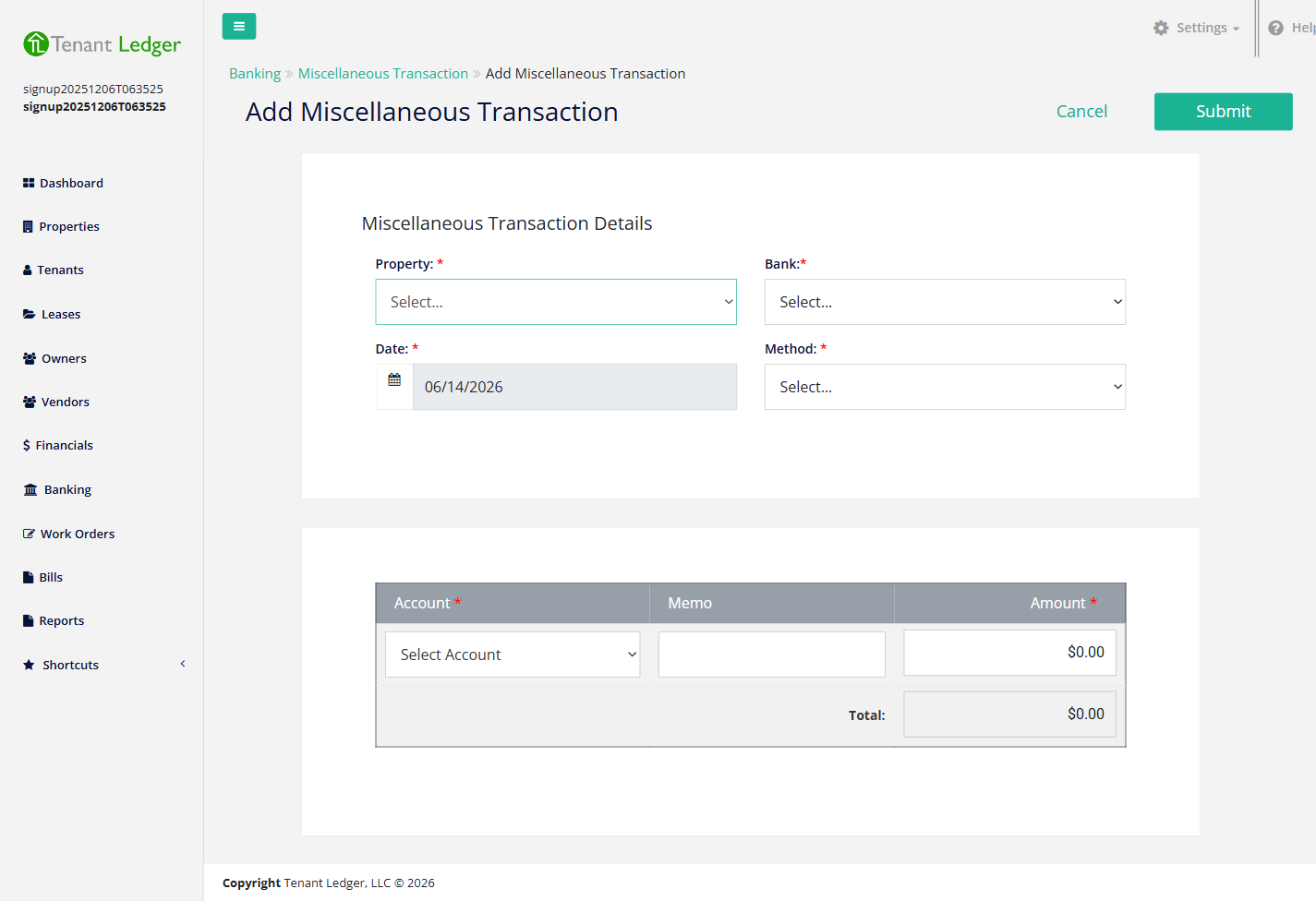
Fill in the Miscellaneous Transaction Details:
- Property (required) — the property this income relates to.
- Bank (required) — the account the money goes into.
- Date (required) — the transaction date (defaults to today).
- Method (required) — how the money came in: Check, Cash, or Direct Deposit. If you choose Check, enter the Check #.
-
In the table below, enter:
- Account (required) — the income category this belongs to, for example “Interest Income”.
- Memo — optional detail.
- Amount (required) — the amount received.
-
Click Submit.
What you’ll see
You land on the transaction’s Summary page. If you chose Direct Deposit, the amount is recorded as a deposit into the bank account automatically. For Check or Cash, it becomes an undeposited item you can group into a deposit batch later. From the Summary’s Action menu you can edit the transaction, delete it, or (if it’s deposited) view the deposit.
Tips
- Use this screen for income with no related charge or bill. Rent and other tenant charges should be recorded as charges and payments instead.
- Recording bank interest or other statement-only items here first makes monthly reconciliation come out even. See Reconcile a bank account.
Related articles
Still stuck? Email support@tenantledger.com and a real person who knows the product will help.